7 best iptv players ranked for Android and Fire TV
Finding the best iptv player for Android or Fire TV comes down to three things: playlist compatibility, EPG support, and how well it handles buffering. The seven players below cover all of that, ranked from most to least versatile based on real daily use.
If you’ve ever spent an afternoon installing three different apps just to get your M3U playlist working, you already know the frustration. The best iptv experience isn’t just about having channels. It’s about an app that stays out of your way, loads the guide fast, and doesn’t crash when you switch between a live football match and a VOD library. I’ve tested most of these on a Fire TV Stick 4K and a mid-range Android box over the past few months, and the differences between them are sharper than you’d expect from software that all technically does the same job.
Table of Contents
- Why the player matters as much as the subscription
- The top 7 players ranked
- How to connect your playlist or Xtream codes
- What to look for in EPG and channel management
- Pricing: free vs paid players
- Common problems and how to fix them
- Frequently Asked Questions
- Conclusion
Why the player matters as much as the subscription
Most people spend all their research time picking a subscription service and then just grab whatever player shows up first in the app store. That’s backwards. A weak player will make even a solid stream feel broken.
The player handles decoding, buffering logic, EPG parsing, and the UI layer between you and your stream. A player with poor HLS handling will buffer on a 100 Mbps connection. A player with no external EPG support means you’re watching blind, with no idea what comes on next. And a player that crashes when your M3U has 10,000 channels is basically useless for large subscriptions.
What a good player actually does under the hood
Decent IPTV players use hardware decoding by default and fall back to software decoding gracefully. They parse M3U playlists locally rather than re-fetching them every time you open the app. They cache EPG data so you’re not waiting 45 seconds for the guide to load after every reboot. The best ones also support multiple connection formats: M3U URL, Xtream Codes API, and MAC address portal login.
If your current player doesn’t support at least two of those formats, you’re already limited before you’ve even picked a channel. And yes, this matters in Finland specifically, because Finnish IPTV subscriptions vary wildly in which connection method they provide. Some give you M3U only. Others use Xtream Codes. A player that handles both is the safer default.
For a detailed breakdown of how one popular option handles this, the iptv smarters player lets you watch M3U channels on any screen is worth reading before you commit to anything.
“IPTV now accounts for roughly 34% of all video streaming traffic in Europe, with Android-based devices making up the largest share of client hardware.” (according to Statista’s video streaming market overview)
The top 7 players ranked
Here’s the upfront answer: TiviMate is the best overall for Android and Fire TV. IPTV Smarters Pro is the best free starting point. Everything else fills specific gaps.
1. TiviMate
TiviMate is what most people end up at after trying three other players. The UI is clean, the EPG loads quickly, and the multi-panel layout on larger screens is genuinely pleasant to use. It supports M3U and Xtream Codes, handles 20,000+ channel lists without slowing down, and has a catchup/timeshift feature that actually works reliably. The paid “Premium” tier runs about 5 USD per year, which is absurdly cheap for what you get. Free version is usable but limits you to one playlist and no multi-view.
2. IPTV Smarters Pro
Smarters Pro is the most versatile free player available. It supports M3U, Xtream Codes, and external EPG sources. The interface is a bit busier than TiviMate, but it runs well on Fire TV Sticks and doesn’t eat much RAM. If you’re on a tight budget or just testing a new subscription, this is the right starting point. The playlist format question comes up constantly with this one. For that specifically, the playlist format that iptv smarters pro actually requires explains exactly what headers and structure the app expects.
3. XCIPTV Player
XCIPTV has been quietly improving for two years. Its standout feature is the built-in video player, which handles streams that cause other players to freeze. Better adaptive buffering than Smarters in my experience, particularly on slower connections around 20-30 Mbps. The UI is darker and more minimal. Not ideal if you want a flashy home screen, but very solid for actual watching.
4. MYTVOnline3
This one is made by Formuler, the company behind MAG-style Android boxes. If you’re on a Formuler device, MYTVOnline3 is the obvious choice. On a generic Android box or Fire TV, it’s still good but not the automatic first pick. Excellent EPG rendering, clean channel categories, and solid 4K support.
5. Sparkle TV
Underrated. Sparkle TV has a genuinely nice UI, supports external EPG via XMLTV, and handles large playlists without the usual slowdown. It’s less well known than Smarters but more polished in some areas. Worth trying if the top two don’t feel right for your setup.
6. IBO Player Pro
IBO Player is built around the Xtream Codes panel, so if your provider uses that system, this app integrates tightly and shows VOD content particularly well. The series/movie sections are better organized here than in most alternatives. Less ideal for pure M3U setups.
7. Perfect Player
Old-school, functional, and still working. Perfect Player is the go-to for people who want total control over their setup, including manual EPG mapping and fine-grained buffering settings. The interface looks like it was designed in 2014, because it was. But for power users who know what they’re doing, that’s not actually a problem.
How to connect your playlist or Xtream codes
The setup process is similar across most players but the terminology varies enough to cause confusion. Here’s the general flow for both connection types.
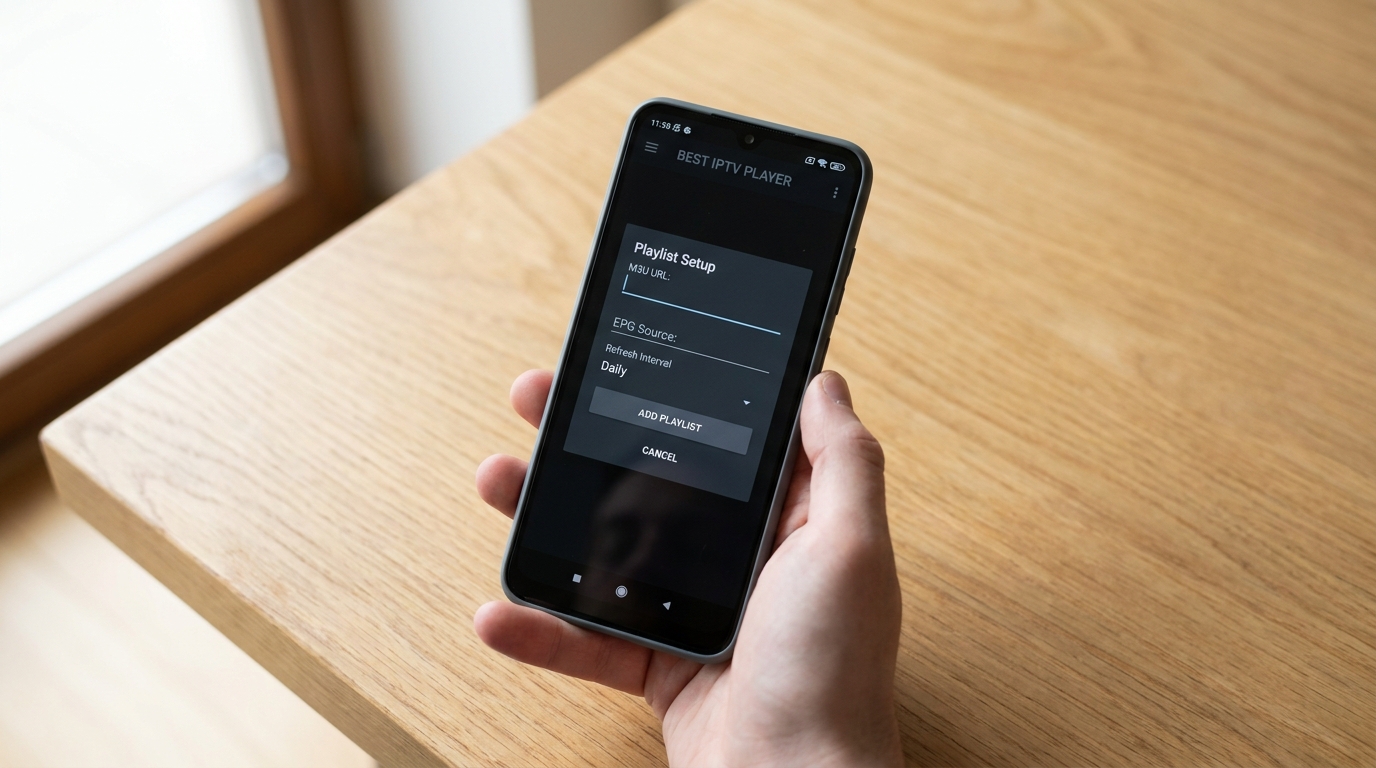
Adding an M3U playlist
- Open the player and find “Add playlist” or “Add source” in the settings menu.
- Select “M3U URL” as the input type.
- Paste the full M3U link your provider sent you. Make sure there are no trailing spaces.
- Set a refresh interval. Daily is usually fine unless your provider rotates streams frequently.
- Add your EPG/XMLTV URL in the same settings area if your provider supplies one separately.
If the playlist loads but shows no channels, the issue is almost always either a malformed M3U header or the player not recognizing the stream type tags. TiviMate is the most forgiving about this. Perfect Player is the least forgiving.
Connecting via Xtream Codes
- Choose “Xtream Codes” or “Portal” as your connection type.
- Enter the server URL, username, and password your provider gave you. The URL usually looks like
http://provider.example:port. - The player will fetch your channel list and VOD library automatically.
- EPG is typically included automatically with Xtream Codes connections.
One thing I noticed during a particularly frustrating Tuesday of setup: some providers give you a URL with a port number that changes, and the player caches the old port. If your streams suddenly stop working after a week, check whether your provider’s server address has changed before reinstalling the whole app.
For a full walkthrough of the Smarters interface specifically, a closer look at the iptv smarters video player app covers the settings screens step by step.
What to look for in EPG and channel management
The Electronic Program Guide is where most players quietly fall apart. A good EPG should load within 5-10 seconds, display at least 3 days of programming, and sync automatically without you having to manually refresh it every morning.
EPG source compatibility
Most players accept XMLTV format EPG files or URLs. The better players let you assign custom EPG sources to individual channels, which matters when your provider’s built-in EPG is incomplete. Finnish channels in particular sometimes have EPG gaps, and being able to point specific channels at a third-party XMLTV source is genuinely useful.
TiviMate and XCIPTV both handle custom EPG mapping well. IPTV Smarters Pro supports it but the UI for doing so is buried three menus deep. Perfect Player gives you the most control but requires manual work.
Channel grouping and favorites
If your subscription has 10,000+ channels, grouping and favorites aren’t optional. They’re survival. The best players let you create custom groups, hide categories you don’t need, and pin your top 20 channels so you’re not scrolling through 400 sports channels to find Yle Areena or a Finnish news stream.
TiviMate does this better than anyone else. Its favorites system is fast, and you can reorder channels by drag-and-drop. Smarters Pro’s favorites work but feel clunky by comparison.
If you’re trying to understand what makes one approach fundamentally different from another, what makes smart iptv different from other IPTV players? does a good job explaining the design philosophy differences.
Pricing: free vs paid players, and subscription costs
The players themselves are mostly free with optional paid upgrades. The real cost question is your subscription service. In Finland, monthly IPTV subscription prices typically range from about 8 to 25 euros per month depending on channel count, VOD library size, and number of simultaneous connections.
What you actually pay for in a player
- TiviMate Premium: roughly 5 USD per year. Unlocks multiple playlists, multi-view, and parental controls. Worth it immediately.
- IPTV Smarters Pro: free. The “Pro” in the name is just branding. No paid tier needed for basic use.
- XCIPTV: free with no meaningful restrictions.
- IBO Player Pro: free base version, small one-time fee for Pro features.
- Perfect Player: free. Has been free for years and shows no signs of changing.
So realistically, the player costs you nothing or close to nothing. Your subscription is where the budget goes.
Comparing subscription options for Finnish users
For context on what a typical subscription looks like at the feature level, take iptv subscription as an example. They offer Xtream Codes and M3U connectivity, which means they’ll work with every player on this list. That kind of dual-format support is something to check explicitly when comparing providers, because some cheaper services lock you into one format only, which limits your player choice down the road.
For a grounded look at what Finnish subscribers are actually paying and whether it’s worth it, is iptv finland worth the monthly subscription cost? breaks down the numbers with some regional context.
And if you’re considering a Nordic-focused package specifically, 5 things to know before subscribing to nordic iptv covers what to check before committing.
Common problems and how to fix them
Buffering is the complaint that comes up most. But buffering usually isn’t a player problem. It’s almost always one of three things: your internet connection, the provider’s server load, or the player’s buffer size setting being too small.
Buffering fixes
- Increase the player’s buffer size. In TiviMate, go to Settings > Player > Buffer size. Bump it from the default 3000ms to 8000-10000ms and see if it helps.
- Switch from WiFi to a wired connection. Fire TV Sticks support Ethernet via an OTG adapter. The difference on a congested 2.4 GHz network can be dramatic.
- Try a different stream URL format. Some providers offer both HLS and RTSP streams. HLS is more stable on Android devices in most cases.
- Check your provider’s server status. If 10 channels buffer simultaneously during peak hours, the problem is upstream, not in your player settings.
Playlist not loading
If your M3U URL returns an error or loads empty, first confirm the URL works in a browser. If it opens correctly there but the player rejects it, the issue is usually the M3U header format. Some players are strict about the #EXTM3U declaration at the top of the file. Smarters Pro in particular will silently fail on playlists with non-standard headers.
A less obvious issue: some corporate or ISP DNS servers block IPTV stream domains. Switching your Fire TV’s DNS to 1.1.1.1 (Cloudflare) or 8.8.8.8 (Google) fixes this more often than you’d think. According to Wikipedia’s article on DNS blocking, ISP-level DNS filtering is common in European markets and frequently affects media streaming services.
App crashing on large playlists
If the player crashes when loading a playlist with 15,000+ channels, the app is running out of memory. On Fire TV Stick Lite or older Fire TV models, this is a real hardware limitation. Options: trim your M3U to channels you actually watch (most providers let you filter by category), or switch to a player with better memory management. XCIPTV and TiviMate handle large playlists more gracefully than most of the alternatives.
Frequently Asked Questions
What is the best iptv player for Fire TV Stick in 2026?
TiviMate is the most consistently recommended player for Fire TV Stick. It handles large playlists efficiently, has solid EPG support, and the premium tier costs under 5 USD per year. IPTV Smarters Pro is the strongest free alternative and works well on all Fire TV models without requiring a paid upgrade.
What is the most reliable IPTV connection method?
Xtream Codes API is generally more reliable than raw M3U URLs because it authenticates per-session and the server manages stream delivery more actively. M3U links can expire or change without warning. If your provider offers both, Xtream Codes is the safer long-term choice for stability across player updates.
What is the most popular IPTV player right now?
TiviMate and IPTV Smarters Pro trade positions depending on which community or forum you check, but TiviMate consistently comes out ahead in user satisfaction surveys within Android TV communities. Smarters Pro has the larger raw install base simply because it’s free and appears higher in search results.
Which best iptv player works on both Android and iOS?
IPTV Smarters Pro has versions for both Android and iOS, making it the most cross-platform option. GSE Smart IPTV is another choice that covers both operating systems. TiviMate is Android and Fire TV only, so iOS users need to look at alternatives like Smarters or GSE.
Do I need a special player for 4K IPTV streams?
Not necessarily a special player, but you need one that supports hardware decoding for HEVC/H.265 streams, which is what most 4K IPTV content uses. TiviMate, XCIPTV, and MYTVOnline3 all support hardware-accelerated H.265 decoding. Check your device’s hardware too, since older Fire TV Sticks cap out at 1080p regardless of the player.
Conclusion
The best iptv player for most people is TiviMate. It’s fast, it handles big playlists, and the EPG actually works. IPTV Smarters Pro is the right call if you want something free and flexible across different devices. The other five players on this list earn their spots for specific use cases, but those two cover probably 80% of what people actually need.
If you’re in Finland and still figuring out which subscription to pair with your player, take your time comparing providers on connection format support and channel selection before committing to anything. Some subscriptions that look good on paper have server issues during peak evening hours that no player setting will fix. For a grounded starting point, iptv subscription is one option worth checking against your own requirements. Pick your player, get your playlist working, and you’ll wonder why you put up with cable for so long.